Live recording and virtual soundcheck,
with the tools of a DAW.
Sonatracks is built for the show: arm every input on your console, record one clean track per channel, and play them back through the desk for virtual soundcheck. When the show is over, it keeps going like a DAW — import audio, arrange clips, punch in fixes, mix and export.
Download the beta See what it does
Features
Made for the stage, capable in the studio
Quick to set up at front of house, with the editing and mixing you expect from a DAW.
Multitrack recording
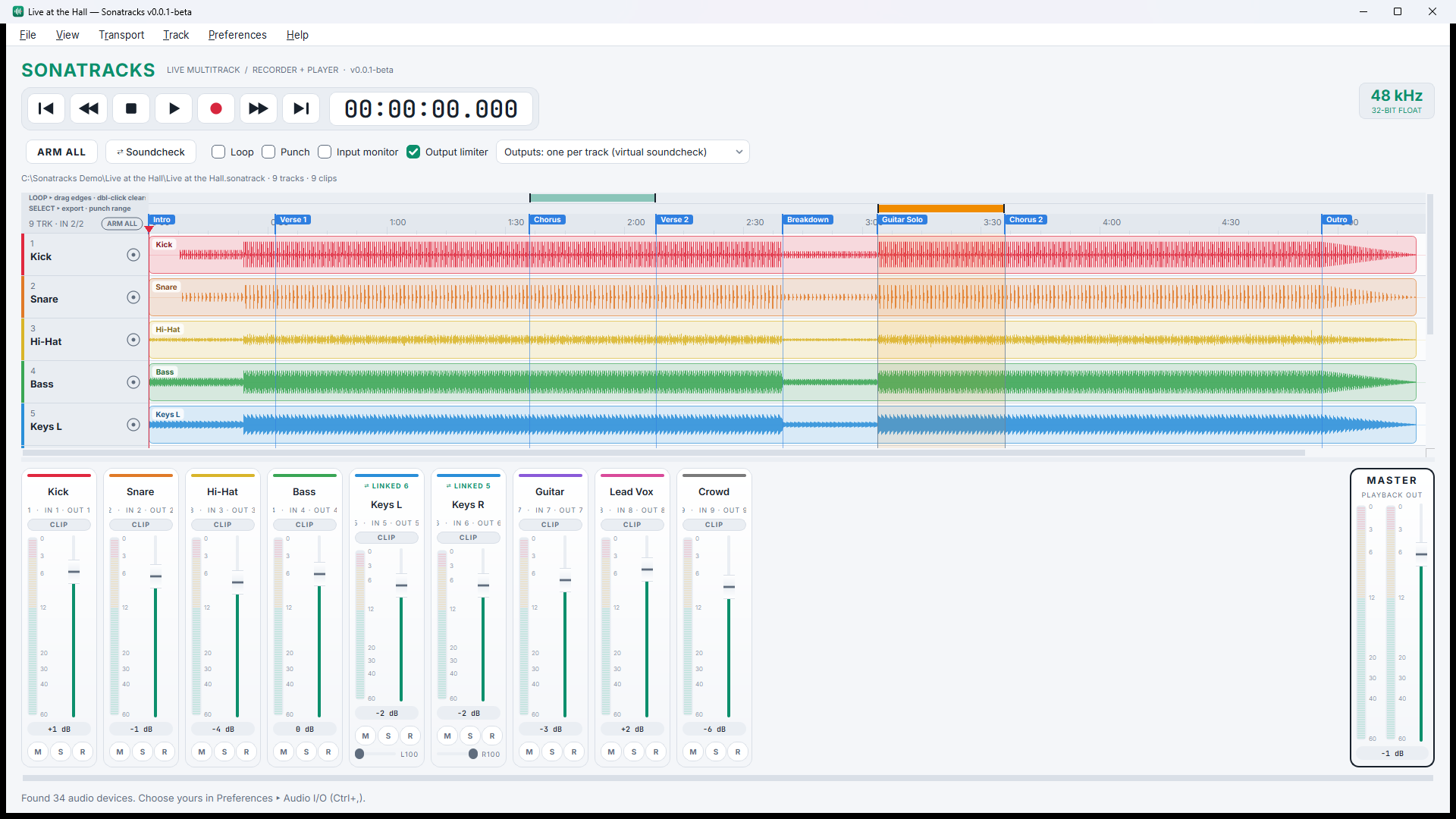
Record every input of your interface at once, one mono WAV per track, with live meters and waveforms as you go.
Punch in / out
Highlight a section on the timeline, enable Punch, and re-record only that part with a pre-roll. Everything outside stays untouched.
Export a range
Select just the song or the solo the performer asked for and export it as stems or a stereo mix — nothing outside the selection.
Import any audio
Drop in WAV, FLAC, MP3 or OGG. Imports are non-destructive: your original files are never changed.
Never lose a take
Recording never overwrites an existing file. New takes cover older ones on the timeline without erasing them, and imported tracks are locked against arming.
Markers, loop and mixer
Drop markers with M, loop a section, link stereo pairs, and balance it all with per-track and master faders.
Virtual soundcheck
Last night's show is tonight's band
Route each recorded track back to the same console channel it came from. Flip the desk to playback and tune EQ, dynamics and monitors against the real performance — at show level, in the empty room.
- Plays back on the same channels it recorded
- Loop the hard section until it sits right
- Light and dark themes, readable at the desk
- Red playhead you can see in any light
Devices
Works with the gear you already have
Sonatracks is vendor-neutral. It talks to your interface through the driver your operating system already uses, so any console or stagebox with a computer connection works.
USB, FireWire, Thunderbolt, Dante and MADI — through ASIO or WASAPI on Windows, Core Audio on macOS, and ALSA, JACK or PipeWire on Linux.
Version 0.0.3 · November 2026
What’s new
Themes, exact punch-ins and faster ways around the timeline.
New in 0.0.3
- Theme gallery. Eleven themes, five light and six dark, from Studio Light to Console Charcoal, Smoked Copper and Phantom Noir. Pick one in View › Theme, or follow your desktop.
- A warmer dark theme. Console Charcoal is built for long nights at front of house: soft off-white text and muted track colours, with red kept for the playhead and alerts.
- Punch Range (Ctrl+P). Type exact punch-in and punch-out times, and set the pre-roll and post-roll. They are saved with the session.
- New shortcuts. P toggles Punch, L toggles Loop, Ctrl + = / Ctrl + − zoom, Ctrl+0 fits the whole session.
- Middle-mouse drag moves around the timeline, through time and tracks.
- Native fonts. Sonatracks now uses your system’s own interface font on Windows, macOS, KDE and GNOME.
- A rewritten user manual with step-by-step guides, troubleshooting and a full shortcut list (F1).
Fixed in 0.0.3
- Dropdowns in light themes no longer show dark rows when Windows or the desktop is set to dark mode.
Previous releases
0.0.2 — reliability update
- Takes stay on the right tracks. If the disk stalls during a long recording, audio can no longer slip onto a neighbouring channel.
- Punch is cleared after a failed start. If a punch could not start (for example an unplugged input), the next normal recording now keeps all of its audio.
- Sessions open from any folder. Folder and file names with accents or Asian characters now work.
- Saving is crash-safe. A full disk or a crash while saving can no longer empty your session file.
- Cancelled exports clean up after themselves, and exports larger than 4 GB are written correctly instead of failing at the end.
- Steadier importing of audio files.
0.0.1 — first public beta
- Punch in / out with a 2-second pre-roll.
- Export just the highlighted part of the timeline, as stems or a stereo mix.
- A red playhead that stays visible in light and dark themes.
- Windows installer, plus .deb and .rpm packages for Linux.
Download
Sonatracks 0.0.3 public beta
This is a beta. Record a backup the way you normally do until you trust it on your rig, and tell us what breaks.
Download for Windows 10/11 (64-bit)
Linux: .deb (Debian, Ubuntu, Mint, Pop!_OS) · .rpm (Fedora, openSUSE, RHEL) · macOS: coming soon

ASIO is a trademark and software of Steinberg Media Technologies GmbH.